AI Workflow Automation That Connects Your Entire Business
Automate repetitive processes, reduce manual handovers and help your team complete work faster with intelligent AI-powered workflows.
Primacy Infotech designs and implements AI workflow automation solutions that connect your ERP, CRM, documents, email, WhatsApp, databases and business applications.
Our solutions can read information, understand requests, validate data, trigger activities, route approvals, update systems and involve the right employee whenever human judgement is required.
AI Workflow Automation That Connects Your Entire Business
Automate repetitive processes, reduce manual handovers and help your team complete work faster with intelligent AI-powered workflows.
Primacy Infotech designs and implements AI workflow automation solutions that connect your ERP, CRM, documents, email, WhatsApp, databases and business applications.
Our solutions can read information, understand requests, validate data, trigger activities, route approvals, update systems and involve the right employee whenever human judgement is required.

Intelligent Automation


Business Process Expertise

ERP Integration
From Manual Work to Intelligent Workflows
Your Business Processes Should Not
Depend on Repetitive Follow-Ups
From Manual Work to Intelligent Workflows
Your Business Processes Should Not
Depend on Repetitive Follow-Ups
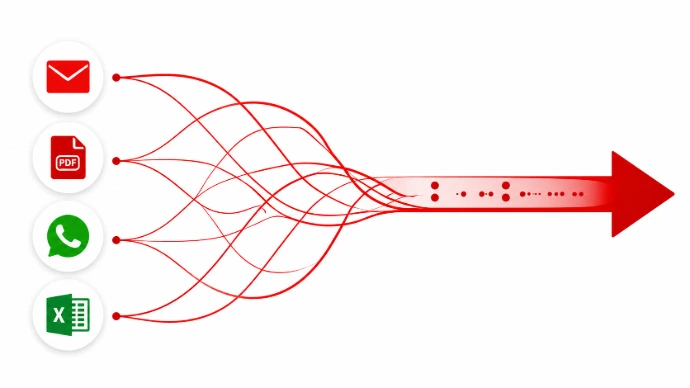
Most organizations still rely on employees to move information manually between emails, spreadsheets, ERP systems, WhatsApp messages and approval chains.
A customer enquiry may arrive by email, but someone has to create the CRM lead manually.
A vendor invoice may arrive as a PDF, but a finance employee has to enter every field into the ERP.
A purchase request may be ready, but the team spends time collecting quotations, preparing comparison sheets and following up for approval.
These steps create delays, duplicate work and avoidable errors.
AI workflow automation connects these activities into one controlled process. It can understand unstructured information, apply business rules, update connected systems and send the task to a person only when approval or exception handling is needed.
Most organizations still rely on employees to move information manually between emails, spreadsheets, ERP systems, WhatsApp messages and approval chains.
A customer enquiry may arrive by email, but someone has to create the CRM lead manually.
A vendor invoice may arrive as a PDF, but a finance employee has to enter every field into the ERP.
A purchase request may be ready, but the team spends time collecting quotations, preparing comparison sheets and following up for approval.
These steps create delays, duplicate work and avoidable errors.
AI workflow automation connects these activities into one controlled process. It can understand unstructured information, apply business rules, update connected systems and send the task to a person only when approval or exception handling is needed.
What Is AI Workflow Automation?
AI workflow automation combines artificial intelligence, business rules, system integration and process automation to complete multi-step business activities.
Traditional automation works best when every input follows a fixed structure. AI-enabled workflows can also work with information from:
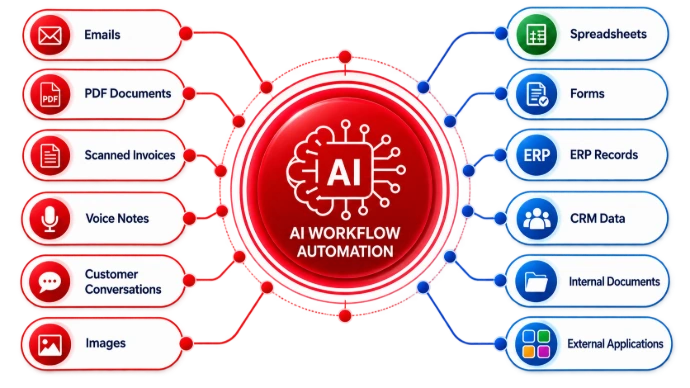
An intelligent workflow may read a document, understand the relevant information, validate it against ERP data, prepare a transaction and send it to the appropriate employee for approval.
The process remains controlled, traceable and aligned with your organization's approval hierarchy.
What Is AI Workflow Automation?
AI workflow automation combines artificial intelligence, business rules, system integration and process automation to complete multi-step business activities.
Traditional automation works best when every input follows a fixed structure. AI-enabled workflows can also work with information from:
An intelligent workflow may read a document, understand the relevant information, validate it against ERP data, prepare a transaction and send it to the appropriate employee for approval.
The process remains controlled, traceable and aligned with your organization's approval hierarchy.
Our AI Workflow Automation Services
We Automate Processes Across Departments and Applications
Primacy develops workflow solutions around actual business operations rather than offering generic automation templates.
Our AI Workflow Automation Services
We Automate Processes Across Departments and Applications
Primacy develops workflow solutions around actual business operations rather than offering generic automation templates.

Lead Capture and CRM Automation
Ensure that every genuine enquiry enters the sales pipeline quickly and reaches the right salesperson.
The workflow can:
Capture enquiries from websites, email, WhatsApp and forms
Extract customer and requirement information
Identify the relevant product or service
Create a lead inside the CRM
Check for possible duplicate leads
Assign the lead based on industry, geography or sales team
Score and priorities the opportunity
Prepare an initial response
Create a follow-up activity
Escalate ignored or delayed leads
Send a daily lead summary to the sales manager
Example Workflow :
Website enquiry received → Requirement understood → Duplicate checked → CRM lead created → Lead assigned → Follow-up drafted → Sales activity scheduled

Enquiry-to-Quotation Automation
Reduce the time between receiving a customer requirement and preparing a quotation.
The workflow can:
Read the customer enquiry
Identify products or services requested
Collect relevant pricing information
Retrieve previous quotations
Check customer-specific terms
Prepare a draft quotation
Route discounts for approval
Send the approved quotation
Create a follow-up activity
Monitor whether the customer responds
Example Workflow :
Customer enquiry → Requirement extraction → Pricing check → Draft quotation → Discount approval → Quotation sent → Follow-up created

Sales Follow-Up Automation
Help the sales team maintain consistent communication without relying on memory or manual reminders.
The workflow can:
Monitor open opportunities
Identify overdue follow-ups
Analyze previous communication
Recommend the next action
Draft personalized email or WhatsApp messages
Create CRM activities
Alert managers about inactive high-value opportunities
Summaries pipeline risks
Record customer responses
Update opportunity stages based on approved rules
Example Workflow:
Open opportunity monitored → Follow-up identified → Communication analyzed → Next action recommended → Personalized message drafted → CRM updated → Customer response recorded → Opportunity stage updated → Manager alerted if needed.

Customer Onboarding Automation
Create a consistent onboarding experience after a new customer confirms an order.
The workflow can:
Collect customer documents
Verify mandatory information
Create the customer record
Generate onboarding tasks
Assign responsible employees
Share welcome information
Schedule implementation meetings
Request missing documents
Track onboarding progress
Escalate delayed activities
Inform the customer about the next step
Example Workflow :
Order confirmed → Customer information collected → Documents checked → Project created → Tasks assigned → Welcome email sent → Kick-off meeting scheduled

Invoice Processing Automation
Reduce manual data entry and improve control over vendor invoices.
The workflow can:
Collect invoices from email or upload
Identify the vendor
Extract invoice information
Check invoice number and date
Detect possible duplicates
Compare the invoice with the purchase order
Verify quantities and pricing
Compare with goods receipt information
Highlight mismatches
Create a draft vendor bill
Route the bill for approval
Archive the original document
Example Workflow :
Invoice received → Data extracted → Vendor identified → PO and GRN matched → Exceptions highlighted → Draft bill created → Approval requested

Purchase and Procurement Automation
Make procurement faster and more transparent.
The workflow can:
Receive internal purchase requests
Check stock availability
Identify approved vendors
Prepare requests for quotation
Send RFQs to vendors
Collect and read quotations
Compare prices, taxes, delivery dates and payment terms
Prepare a comparison statement
Recommend the most suitable option
Route the recommendation for approval
Create a draft purchase order
Follow up on delayed vendor responses
Example Workflow :
Purchase request → Stock checked → Vendors selected → RFQs sent → Quotations collected → Comparison prepared → Approval received → Purchase order created

Expense Management Automation
Simplify employee expense submission, verification and approval.
The workflow can:
Receive expense receipts
Extract date, amount and vendor information
Classify the expense
Check policy limits
Identify missing documents
Detect possible duplicate claims
Route the request to the correct manager
Create a draft expense entry
Notify the employee about approval or rejection
Maintain an audit trail

Payment Collection Automation
Support finance and sales teams with consistent receivable follow-up.
The workflow can:
Review outstanding invoices
Identify invoices approaching their due date
Prioritise overdue customers
Analyse previous payment behaviour
Prepare personalised reminders
Create collection activities
Assign follow-ups to responsible employees
Escalate high-value overdue accounts
Record customer commitments
Send management summaries
Update the collection status
Example Workflow :
Outstanding reviewed → Customers prioritised → Reminder drafted → Employee approval → Message sent → Activity created → Promise-to-pay tracked → Escalation generated

Customer Support Automation
Connect customer requests with the right support process.
The workflow can:
Capture requests from email, website and WhatsApp
Understand the customer’s issue
Identify the customer and product
Search approved knowledge sources
Provide an immediate response when appropriate
Create a support ticket
Assign priority and category
Route the ticket to the right employee
Monitor resolution deadlines
Escalate delayed cases
Send status updates
Close the ticket after confirmation

Employee Onboarding Automation
Provide a structured onboarding process for every new employee.
The workflow can:
Collect personal and employment documents
Verify required information
Create employee records
Assign onboarding tasks
Inform IT, HR and reporting managers
Request system access
Share company policies
Schedule induction sessions
Track document completion
Send joining reminders
Escalate pending activities
Example Workflow :
Candidate accepted → Documents requested → Employee record prepared → Departments notified → Access tasks created → Induction scheduled → Onboarding tracked

Project Management Automation
Improve task accountability and project visibility.
The workflow can:
Convert meeting notes into action items
Create project tasks
Assign responsibilities
Set deadlines
Send reminders
Track overdue tasks
Summarise project progress
Identify unresolved dependencies
Prepare client updates
Escalate critical delays
Monitor timesheets and effort
Generate review reports

Manufacturing Workflow Automation
Automate selected processes across production, inventory and quality operations.
The workflow can:
Review confirmed sales demand
Check material availability
Identify shortages
Create material requests
Prepare draft purchase requirements
Monitor production progress
Identify delayed manufacturing orders
Collect quality results
Escalate failed quality checks
Track rework requirements
Prepare daily production summaries
Alert management about bottlenecks
Lead Capture and CRM Automation
Ensure that every genuine enquiry enters the sales pipeline quickly and reaches the right salesperson.
The workflow can:
Capture enquiries from websites, email, WhatsApp and forms
Extract customer and requirement information
Identify the relevant product or service
Create a lead inside the CRM
Check for possible duplicate leads
Assign the lead based on industry, geography or sales team
Score and priorities the opportunity
Prepare an initial response
Create a follow-up activity
Escalate ignored or delayed leads
Send a daily lead summary to the sales manager
Example Workflow :
Website enquiry received → Requirement understood → Duplicate checked → CRM lead created → Lead assigned → Follow-up drafted → Sales activity scheduled
Enquiry-to-Quotation Automation
Reduce the time between receiving a customer requirement and preparing a quotation.
The workflow can:
Read the customer enquiry
Identify products or services requested
Collect relevant pricing information
Retrieve previous quotations
Check customer-specific terms
Prepare a draft quotation
Route discounts for approval
Send the approved quotation
Create a follow-up activity
Monitor whether the customer responds
Example Workflow :
Customer enquiry → Requirement extraction → Pricing check → Draft quotation → Discount approval → Quotation sent → Follow-up created
Sales Follow-Up Automation
Help the sales team maintain consistent communication without relying on memory or manual reminders.
The workflow can:
Monitor open opportunities
Identify overdue follow-ups
Analyze previous communication
Recommend the next action
Draft personalized email or WhatsApp messages
Create CRM activities
Alert managers about inactive high-value opportunities
Summaries pipeline risks
Record customer responses
Update opportunity stages based on approved rules
Example Workflow:
Open opportunity monitored → Follow-up identified → Communication analyzed → Next action recommended → Personalized message drafted → CRM updated → Customer response recorded → Opportunity stage updated → Manager alerted if needed.
Customer Onboarding Automation
Create a consistent onboarding experience after a new customer confirms an order.
The workflow can:
Collect customer documents
Verify mandatory information
Create the customer record
Generate onboarding tasks
Assign responsible employees
Share welcome information
Schedule implementation meetings
Request missing documents
Track onboarding progress
Escalate delayed activities
Inform the customer about the next step
Example Workflow :
Order confirmed → Customer information collected → Documents checked → Project created → Tasks assigned → Welcome email sent → Kick-off meeting scheduled
Invoice Processing Automation
Reduce manual data entry and improve control over vendor invoices.
The workflow can:
Collect invoices from email or upload
Identify the vendor
Extract invoice information
Check invoice number and date
Detect possible duplicates
Compare the invoice with the purchase order
Verify quantities and pricing
Compare with goods receipt information
Highlight mismatches
Create a draft vendor bill
Route the bill for approval
Archive the original document
Example Workflow :
Invoice received → Data extracted → Vendor identified → PO and GRN matched → Exceptions highlighted → Draft bill created → Approval requested
Purchase and Procurement Automation
Make procurement faster and more transparent.
The workflow can:
Receive internal purchase requests
Check stock availability
Identify approved vendors
Prepare requests for quotation
Send RFQs to vendors
Collect and read quotations
Compare prices, taxes, delivery dates and payment terms
Prepare a comparison statement
Recommend the most suitable option
Route the recommendation for approval
Create a draft purchase order
Follow up on delayed vendor responses
Example Workflow :
Purchase request → Stock checked → Vendors selected → RFQs sent → Quotations collected → Comparison prepared → Approval received → Purchase order created
Expense Management Automation
Simplify employee expense submission, verification and approval.
The workflow can:
Receive expense receipts
Extract date, amount and vendor information
Classify the expense
Check policy limits
Identify missing documents
Detect possible duplicate claims
Route the request to the correct manager
Create a draft expense entry
Notify the employee about approval or rejection
Maintain an audit trail
Payment Collection Automation
Support finance and sales teams with consistent receivable follow-up.
The workflow can:
Review outstanding invoices
Identify invoices approaching their due date
Prioritise overdue customers
Analyse previous payment behaviour
Prepare personalised reminders
Create collection activities
Assign follow-ups to responsible employees
Escalate high-value overdue accounts
Record customer commitments
Send management summaries
Update the collection status
Example Workflow :
Outstanding reviewed → Customers prioritised → Reminder drafted → Employee approval → Message sent → Activity created → Promise-to-pay tracked → Escalation generated
Customer Support Automation
Connect customer requests with the right support process.
The workflow can:
Capture requests from email, website and WhatsApp
Understand the customer’s issue
Identify the customer and product
Search approved knowledge sources
Provide an immediate response when appropriate
Create a support ticket
Assign priority and category
Route the ticket to the right employee
Monitor resolution deadlines
Escalate delayed cases
Send status updates
Close the ticket after confirmation
Employee Onboarding Automation
Provide a structured onboarding process for every new employee.
The workflow can:
Collect personal and employment documents
Verify required information
Create employee records
Assign onboarding tasks
Inform IT, HR and reporting managers
Request system access
Share company policies
Schedule induction sessions
Track document completion
Send joining reminders
Escalate pending activities
Example Workflow :
Candidate accepted → Documents requested → Employee record prepared → Departments notified → Access tasks created → Induction scheduled → Onboarding tracked
Project Management Automation
Improve task accountability and project visibility.
The workflow can:
Convert meeting notes into action items
Create project tasks
Assign responsibilities
Set deadlines
Send reminders
Track overdue tasks
Summarise project progress
Identify unresolved dependencies
Prepare client updates
Escalate critical delays
Monitor timesheets and effort
Generate review reports
Manufacturing Workflow Automation
Automate selected processes across production, inventory and quality operations.
The workflow can:
Review confirmed sales demand
Check material availability
Identify shortages
Create material requests
Prepare draft purchase requirements
Monitor production progress
Identify delayed manufacturing orders
Collect quality results
Escalate failed quality checks
Track rework requirements
Prepare daily production summaries
Alert management about bottlenecks
AI Workflow Automation with ERP
Connect Intelligence with the System That Runs Your Business
AI Workflow Automation with ERP
Connect Intelligence with the System That Runs Your Business
ERP is often the central source of sales, finance, inventory, purchase, manufacturing and employee information.
Primacy connects AI workflows with ERP so that information does not remain isolated inside email, spreadsheets or communication tools.
We can develop workflows for: Odoo ERPNext SAP Business One Zoho applications Custom ERP systems Legacy business applications
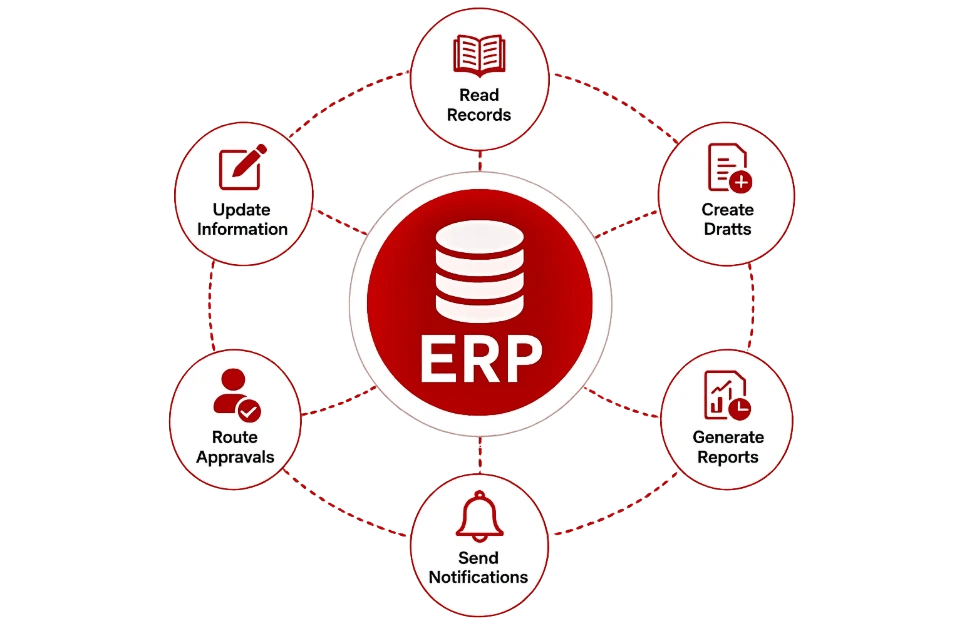
Depending on the approved integration, the workflow may: Read authorized records Search historical transactions Create draft records Update selected fields Generate reports Create activities Route approvals Send notifications Trigger external applications Attach documents Maintain workflow status
Critical financial, commercial or operational transactions can remain subject to human approval.
ERP is often the central source of sales, finance, inventory, purchase, manufacturing and employee information.
Primacy connects AI workflows with ERP so that information does not remain isolated inside email, spreadsheets or communication tools.
We can develop workflows for: Odoo ERPNext SAP Business One Zoho applications Custom ERP systems Legacy business applications
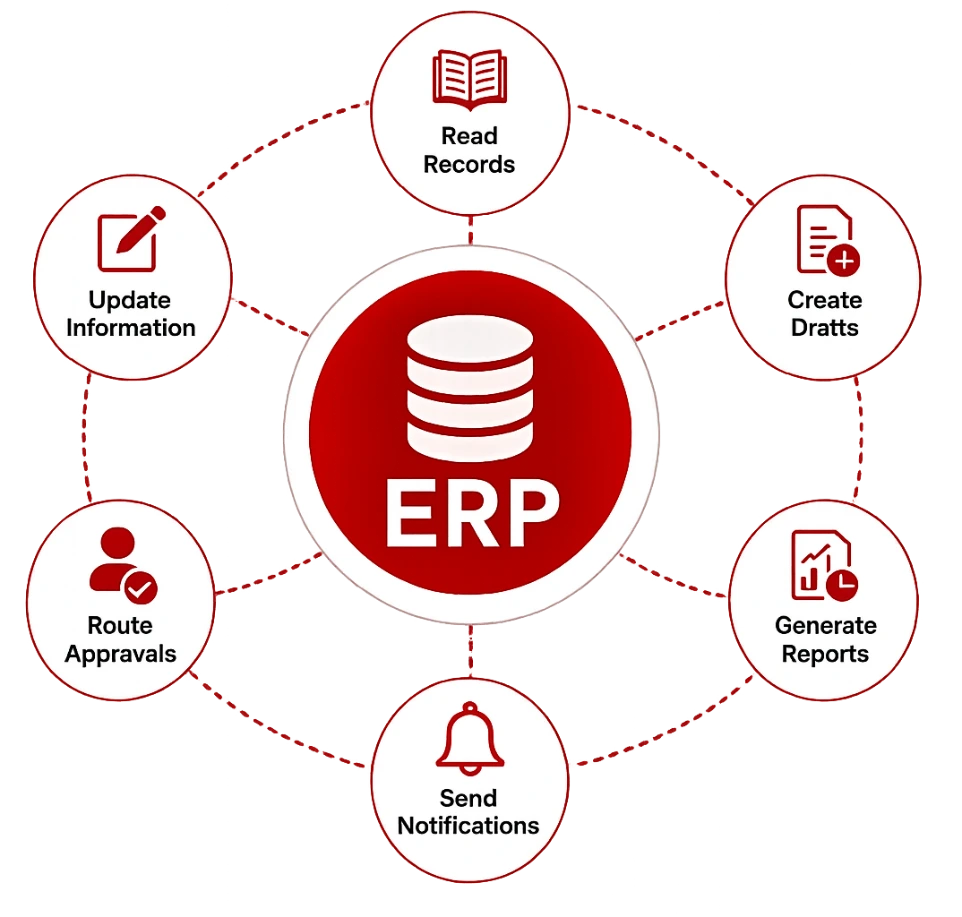
Depending on the approved integration, the workflow may: Read authorized records Search historical transactions Create draft records Update selected fields Generate reports Create activities Route approvals Send notifications Trigger external applications Attach documents Maintain workflow status
Critical financial, commercial or operational transactions can remain subject to human approval.
Odoo AI Workflow Automation
Make Odoo Processes More Intelligent
Primacy can connect AI-powered workflows with Odoo modules such as:
Odoo AI Workflow Automation
Make Odoo Processes More Intelligent
Primacy can connect AI-powered workflows with Odoo modules such as:

CRM

Sales
Purchase

Inventory

Accounting

Manufacturing

Helpdesk
Project
HR/Employee
Expenses
Documents

Maintenance
CRM
Sales
Purchase
Inventory
Accounting
Manufacturing
Helpdesk
Project
HR/Employee
Expenses
Documents
Maintenance
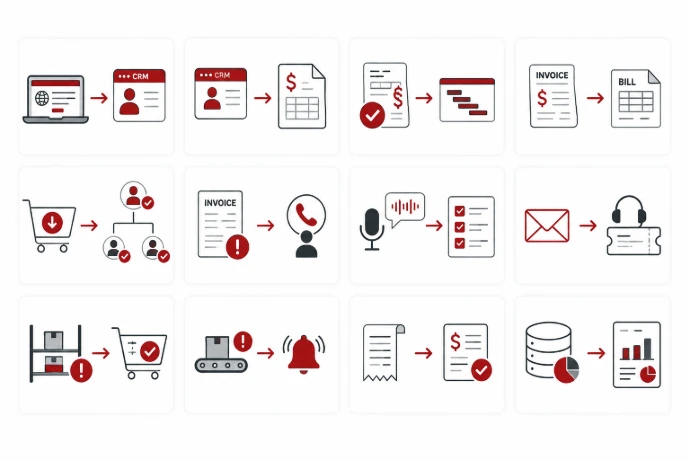
Sample Odoo Workflows
Website enquiry to CRM opportunity
CRM opportunity to draft quotation
Approved quotation to project creation
Vendor invoice to draft bill
Purchase request to multi-level approval
Overdue invoice to collection activity
Meeting transcript to project tasks
Helpdesk email to ticket classification
Stock shortage to purchase recommendation
Production delay to management alert
Employee receipt to expense entry
Daily ERP data to CEO management brief
Sample Odoo Workflows
Website enquiry to CRM opportunity
CRM opportunity to draft quotation
Approved quotation to project creation
Vendor invoice to draft bill
Purchase request to multi-level approval
Overdue invoice to collection activity
Meeting transcript to project tasks
Helpdesk email to ticket classification
Stock shortage to purchase recommendation
Production delay to management alert
Employee receipt to expense entry
Daily ERP data to CEO management brief
Communication Channel Integration
Automate Work Across the Channels Your Team Already Uses
Communication Channel Integration
Automate Work Across the Channels Your Team Already Uses
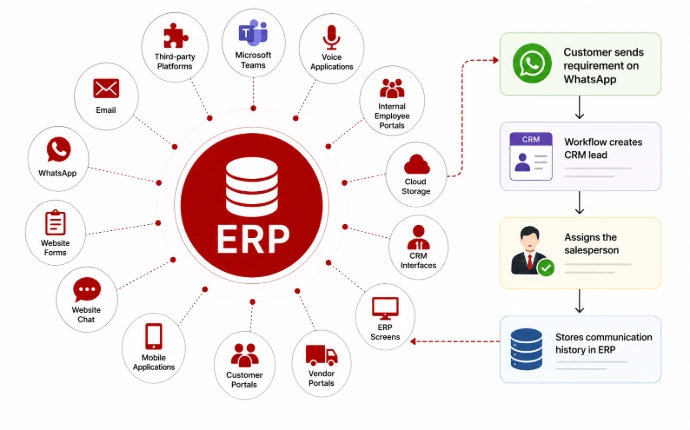
AI workflows can connect with:
Email, WhatsApp, Website forms, Mobile applications, Customer portals, Vendor portals, ERP screens, CRM interfaces, Cloud storage, Internal employee portals, Voice applications, Microsoft Teams, Supported third-party platforms.
For example, a customer may send a requirement through WhatsApp, while the workflow creates the CRM lead, assigns the salesperson and stores the communication history inside the ERP.
AI workflows can connect with:
Email, WhatsApp, Website forms, Mobile applications, Customer portals, Vendor portals, ERP screens, CRM interfaces, Cloud storage, Internal employee portals, Voice applications, Microsoft Teams, Supported third-party platforms.
For example, a customer may send a requirement through WhatsApp, while the workflow creates the CRM lead, assigns the salesperson and stores the communication history inside the ERP.
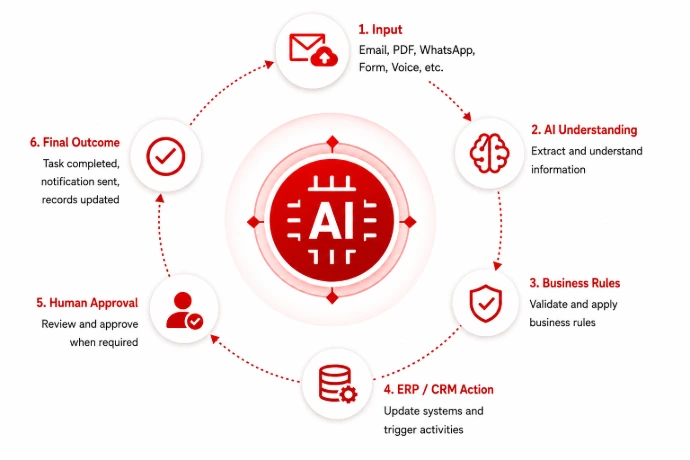
How an AI Workflow Works
A Controlled Journey from Input to Business Outcome
How an AI Workflow Works
A Controlled Journey from Input to Business Outcome
Rule-Based Automation and AI Automation
Use the Right Technology for Each Step
Rule-Based Automation and AI Automation
Use the Right Technology for Each Step
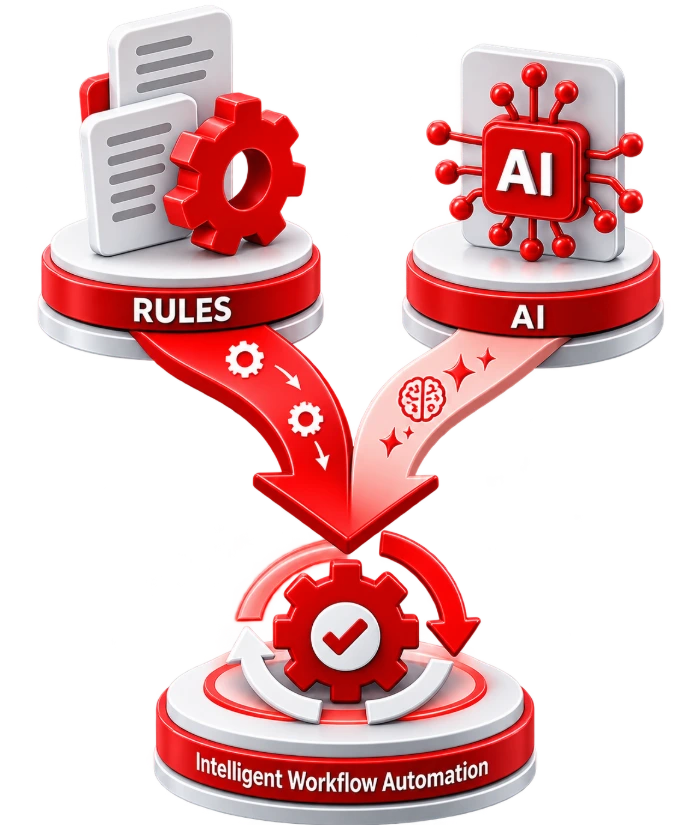
Not every business process requires artificial intelligence.
A fixed rule is often better for predictable tasks such as:
Sending a reminder after a defined number of days
Routing a request based on transaction value
Creating an activity when a stage changes
Notifying a manager when approval is pending
AI becomes useful when the workflow needs to:
Read an unstructured document
Understand an email
Summaries a conversation
Classify a request
Extract information
Compare different documents
Recommend an action
Draft a response
Work with natural-language instructions
Primacy combines AI with traditional automation instead of using AI unnecessarily in every step. This improves reliability, control and implementation cost.
Not every business process requires artificial intelligence.
A fixed rule is often better for predictable tasks such as:
Sending a reminder after a defined number of days
Routing a request based on transaction value
Creating an activity when a stage changes
Notifying a manager when approval is pending
AI becomes useful when the workflow needs to:
Read an unstructured document
Understand an email
Summaries a conversation
Classify a request
Extract information
Compare different documents
Recommend an action
Draft a response
Work with natural-language instructions
Primacy combines AI with traditional automation instead of using AI unnecessarily in every step. This improves reliability, control and implementation cost.
Human Approval and Exception Handling
Automation Should Not Remove Business Control
An effective workflow knows when it can proceed and when it must stop for human review.
Human Approval and Exception Handling
Automation Should Not Remove Business Control
An effective workflow knows when it can proceed and when it must stop for human review.
Human approval may be required when:
A discount exceeds a defined limit
An invoice does not match the purchase order
A customer has exceeded the credit limit
A purchase value crosses an approval threshold
Important information is missing
The AI is not sufficiently confident
The request involves sensitive employee data
A financial transaction is being confirmed
An unusual or risky pattern is detected
The workflow encounters an unknown situation
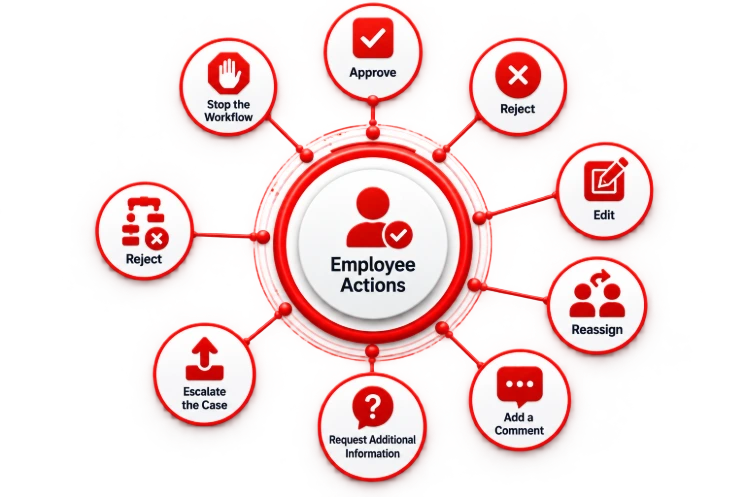
Employees should be able to:
Approve
Reject
Edit
Reassign
Add a comment
Request additional information
Escalate the case
Stop the workflow
Human approval may be required when:
A discount exceeds a defined limit
An invoice does not match the purchase order
A customer has exceeded the credit limit
A purchase value crosses an approval threshold
Important information is missing
The AI is not sufficiently confident
The request involves sensitive employee data
A financial transaction is being confirmed
An unusual or risky pattern is detected
The workflow encounters an unknown situation
Employees should be able to:
Approve
Reject
Edit
Reassign
Add a comment
Request additional information
Escalate the case
Stop the workflow
Security and Governance
Intelligent Automation with Appropriate Controls
Primacy designs AI workflow automation with business security and accountability in mind.
Security and Governance
Intelligent Automation with Appropriate Controls
Primacy designs AI workflow automation with business security and accountability in mind.
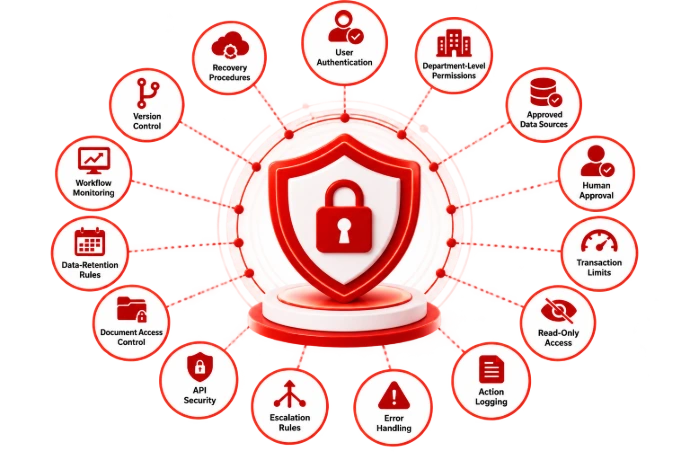
Possible controls include:
User authentication
Role-based access
Department-level permissions
Approved data sources
Human approval
Transaction limits
Read-only access
Action logging
Error handling
Escalation rules
API security
Document access control
Data-retention rules
Workflow monitoring
Version control
Recovery procedures
The required architecture depends on the organization's systems, data policies and operational responsibilities.
Possible controls include:
User authentication
Role-based access
Department-level permissions
Approved data sources
Human approval
Transaction limits
Read-only access
Action logging
Error handling
Escalation rules
API security
Document access control
Data-retention rules
Workflow monitoring
Version control
Recovery procedures
The required architecture depends on the organization's systems, data policies and operational responsibilities.
Our AI Workflow Automation Process
How Primacy Takes a Workflow from Idea to Implementation
Our AI Workflow Automation Process
How Primacy Takes a Workflow from Idea to Implementation

Step 1: Process Discovery
We meet with process owners and understand how the work is currently completed.

Step 2: Workflow Mapping
We document each step, user, system, approval, input, exception and expected output.

Step 3: Automation Opportunity Analysis
We identify which steps should be automated, which require AI and which should remain with employees.

Step 4: Data and Integration Review
We review the ERP, CRM, documents, APIs, communication channels and other systems involved.

Step 5: Proof of Concept
We build a focused workflow to test the process, integration and expected business value.

Step 6: Development and Configuration
We develop the workflow, AI components, integrations, rules, approvals and notifications.

Step 7: Testing
We test normal cases, exceptions, permissions, incorrect data and approval scenarios.

Step 8: Deployment and Training
We deploy the approved workflow and train the users responsible for operating and supervising it.

Step 9: Monitoring and Improvement
We monitor usage, errors, delays, employee feedback and process performance.
Step 1: Process Discovery
We meet with process owners and understand how the work is currently completed.
Step 2: Workflow Mapping
We document each step, user, system, approval, input, exception and expected output.
Step 3: Automation Opportunity Analysis
We identify which steps should be automated, which require AI and which should remain with employees.
Step 4: Data and Integration Review
We review the ERP, CRM, documents, APIs, communication channels and other systems involved.
Step 5: Proof of Concept
We build a focused workflow to test the process, integration and expected business value.
Step 6: Development and Configuration
We develop the workflow, AI components, integrations, rules, approvals and notifications.
Step 7: Testing
We test normal cases, exceptions, permissions, incorrect data and approval scenarios.
Step 8: Deployment and Training
We deploy the approved workflow and train the users responsible for operating and supervising it.
Step 9: Monitoring and Improvement
We monitor usage, errors, delays, employee feedback and process performance.
Where Should Your Business Start?
Start with a Process That Is Repetitive and Measurable
Where Should Your Business Start?
Start with a Process That Is Repetitive and Measurable
A high volume of repeated activities Manual data transfer Multiple systems Frequent follow-up Clear business rules Defined approvals Delays caused by handovers Measurable time or cost impact A clear process owner Lead capture Invoice processing Payment follow-up Purchase approvals Vendor comparison Employee onboarding Meeting-to-task conversion Customer support routing Daily management reporting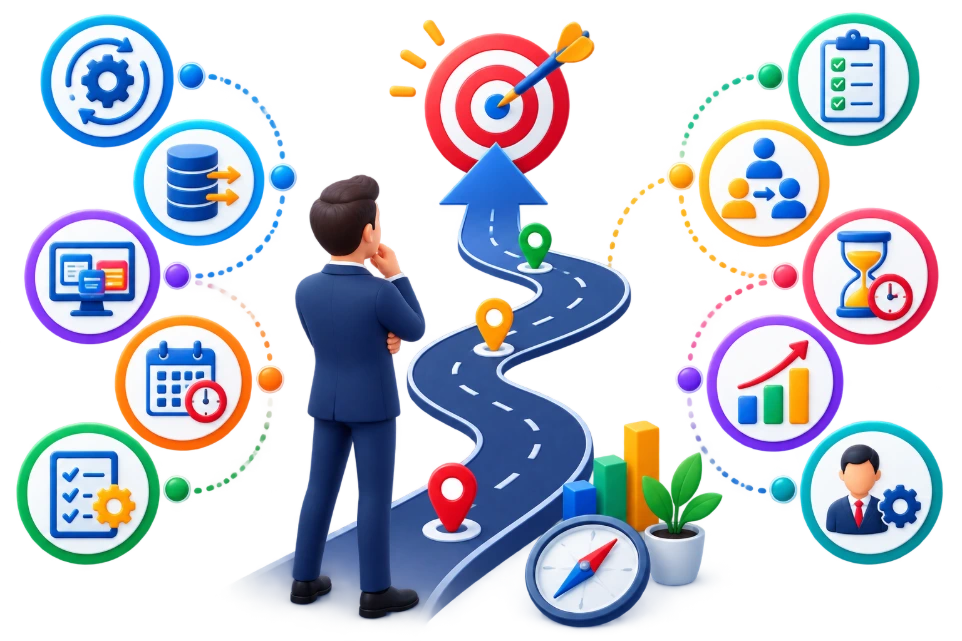 A high volume of repeated activities Manual data transfer Multiple systems Frequent follow-up Clear business rules Defined approvals Delays caused by handovers Measurable time or cost impact A clear process owner
Good starting workflows include:
Lead capture Invoice processing Payment follow-up Purchase approvals Vendor comparison Employee onboarding Meeting-to-task conversion Customer support routing Daily management reporting
Business Benefits of AI Workflow Automation

Reduce Repetitive Work
Automate data entry, classification, document reading, follow-up and reporting activities.

Reduce Process Delays
Move tasks immediately between systems, departments and approval levels.

Improve Data Accuracy
Move tasks immediately between systems, departments and approval levels.

Improve Accountability
Track each step, employee action, approval and exception.

Improve Customer Response
Respond faster to enquiries, support requests, orders and service updates.

Improve Employee Productivity
Allow employees to focus on decisions, relationships and higher-value work.
Improve Process Compliance
Ensure each workflow follows defined conditions, approvals and documentation requirements.

Improve Visibility
Give managers real-time information about pending, delayed and completed processes.

Scale Operations
Handle higher transaction volumes without proportionally increasing administrative work.
Industries We Serve
AI workflow automation can support businesses across:

Manufacturing

Trading and distribution

Retail

E-Commerce

Healthcare

Education

Professional services

IT services

Construction

Field sales

Logistics

Multi-location businesses
Manufacturing
Trading and distribution
Retail
E-Commerce
Healthcare
Education
Professional services
IT services
Construction
Field sales
Logistics
Multi-location businesses
Each solution should reflect the organization's actual business rules, approval structure and operating environment.
Why Choose Primacy Infotech?
We Understand the Process Behind the Automation
Workflow automation is not only a technical integration project. A successful solution requires a clear understanding of the business process, responsible users, data, approvals and exceptions.
Primacy brings together ERP implementation, AI development, application development and business process automation.
Why Choose Primacy Infotech?
We Understand the Process Behind the Automation
Workflow automation is not only a technical integration project. A successful solution requires a clear understanding of the business process, responsible users, data, approvals and exceptions.
Primacy brings together ERP implementation, AI development, application development and business process automation.
AI Workflow Automation Proof of Concept
Test One Process Before Expanding
AI Workflow Automation Proof of Concept
Test One Process Before Expanding
AI Workflow Automation Proof of Concept
Test One Process Before Expanding
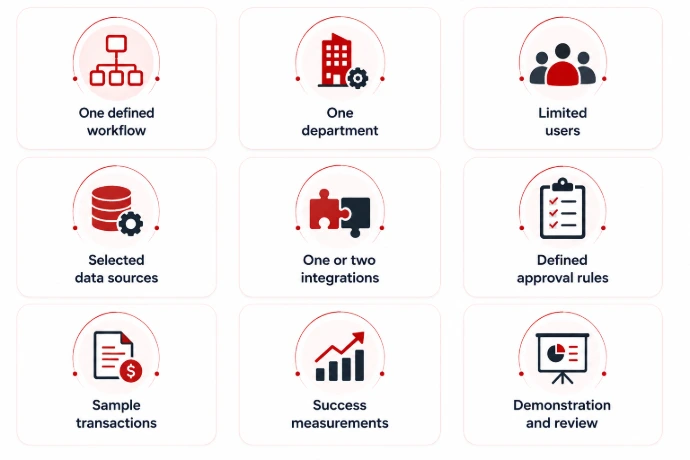
Suggested Proof-of-Concept Use Cases
Test One Process Before Expanding
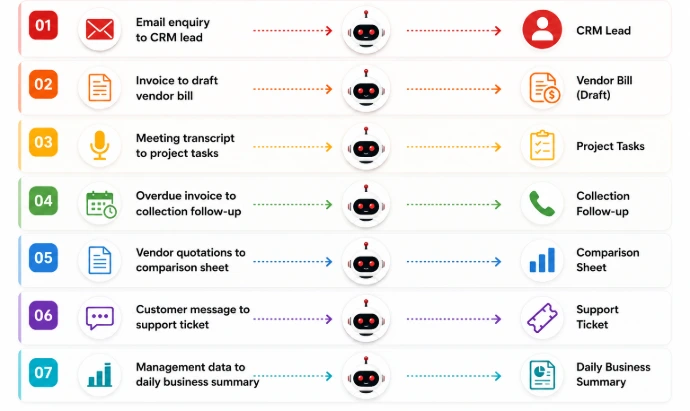
AI Workflow Automation Proof of Concept
Test One Process Before Expanding
Suggested Proof-of-Concept Use Cases
Test One Process Before Expanding
Frequently Asked Question
Frequently Asked Question
AI workflow automation uses artificial intelligence, business rules and software integration to complete multi-step processes. It can understand emails, documents and conversations, retrieve business data, prepare actions and involve employees when approval is required.
Traditional automation works with fixed rules and structured inputs. AI workflow automation can also interpret unstructured information such as documents, emails, messages and natural-language requests.
Yes. Integration depends on the ERP’s available APIs, database access, customization and security requirements. Primacy can assess the available integration methods during discovery.
Yes. We can automate selected processes across Odoo CRM, sales, purchase, inventory, accounting, manufacturing, helpdesk, project, HR, documents and other supported modules.
Yes. Supported workflows can capture information, send notifications, draft responses or continue business processes through email and approved WhatsApp integrations.
No. The workflow usually connects with and extends the organization's existing ERP, CRM and business applications.
Yes. Approval steps can be added based on the process, amount, risk, department, transaction type or other business conditions.
Yes. AI can classify documents, extract information, validate it and create draft records for employee review.
No. Some processes are better handled with standard automation. Primacy evaluates where AI adds value and where fixed business rules are more reliable.
The timeline depends on workflow complexity, system integrations, data quality, approvals, exceptions and testing requirements.
Yes. Starting with one focused, high-impact workflow is usually the most practical approach.
Yes. Primacy can provide monitoring, maintenance, improvements, user support and additional workflow development.
AI workflow automation uses artificial intelligence, business rules and software integration to complete multi-step processes. It can understand emails, documents and conversations, retrieve business data, prepare actions and involve employees when approval is required.
Traditional automation works with fixed rules and structured inputs. AI workflow automation can also interpret unstructured information such as documents, emails, messages and natural-language requests.
Yes. Integration depends on the ERP’s available APIs, database access, customization and security requirements. Primacy can assess the available integration methods during discovery.
Yes. We can automate selected processes across Odoo CRM, sales, purchase, inventory, accounting, manufacturing, helpdesk, project, HR, documents and other supported modules.
Yes. Supported workflows can capture information, send notifications, draft responses or continue business processes through email and approved WhatsApp integrations.
No. The workflow usually connects with and extends the organization's existing ERP, CRM and business applications.
Yes. Approval steps can be added based on the process, amount, risk, department, transaction type or other business conditions.
Yes. AI can classify documents, extract information, validate it and create draft records for employee review.
No. Some processes are better handled with standard automation. Primacy evaluates where AI adds value and where fixed business rules are more reliable.
The timeline depends on workflow complexity, system integrations, data quality, approvals, exceptions and testing requirements.
Yes. Starting with one focused, high-impact workflow is usually the most practical approach.
Yes. Primacy can provide monitoring, maintenance, improvements, user support and additional workflow development.
Which Business Process Is Slowing Your Team Down?
Start with one repetitive workflow, one approval bottleneck or one process that requires too much manual follow-up.
Primacy will help you map the process, identify the right automation approach and build a practical solution connected with your existing systems.
 Book a Free AI Automation Assessment
 Request a Workflow Automation Demo
Contact Information :
Primacy Infotech Pvt. Ltd.
Email: info@primacyinfotech.com
Phone: +91 9088015966 / +91 9088015965
Website: www.primacyinfotech.in
Which Business Process Is Slowing Your Team Down?
Start with one repetitive workflow, one approval bottleneck or one process that requires too much manual follow-up.
Primacy will help you map the process, identify the right automation approach and build a practical solution connected with your existing systems.
Contact Information :
Primacy Infotech Pvt. Ltd.
Email: info@primacyinfotech.com
Phone: +91 9088015966 / +91 9088015965
Website: www.primacyinfotech.in